Functions | |
| void | fltk::alert (const char *,...) |
| int | fltk::ask (const char *,...) |
| int | fltk::choice (const char *q, const char *b0, const char *b1, const char *b2,...) |
| int | fltk::choice_alert (const char *q, const char *b0, const char *b1, const char *b2,...) |
| bool | fltk::color_chooser (const char *name, Color &c) |
| bool | fltk::color_chooser (const char *name, uchar &r, uchar &g, uchar &b, uchar &a) |
| bool | fltk::color_chooser (const char *name, uchar &r, uchar &g, uchar &b) |
| bool | fltk::color_chooser (const char *name, float &r, float &g, float &b, float &a) |
| bool | fltk::color_chooser (const char *name, float &r, float &g, float &b) |
| char * | fltk::file_chooser (const char *message, const char *pattern, const char *filename, bool save=true) |
| void | fltk::file_chooser_callback (void(*cb)(const char *)) |
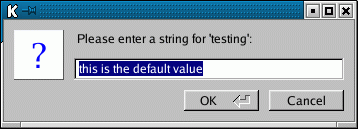
| const char * | fltk::input (const char *label, const char *deflt=0,...) |
| void | fltk::message (const char *,...) |
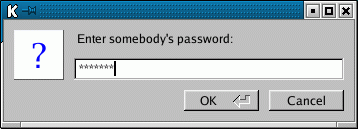
| const char * | fltk::password (const char *label, const char *deflt=0,...) |
| Color | fltk::show_colormap (Color oldcol) |
| void | fltk::use_system_file_chooser (bool=true) |
Variables | |
| const char * | fltk::cancel |
| NamedStyle * | fltk::icon_style |
| NamedStyle * | fltk::message_style |
| const char * | fltk::no |
| const char * | fltk::ok |
| const char * | fltk::yes |
Currently these are all built using normal fltk widgets. In theory these should be services provided by the operating system or desktop environment, but so far no non-ugly scheme has been developed for that. Unfortunatly the space for these dialogs can often end up being the majority of an FLTK program's size.
|
||||||||||||
|
|
|
||||||||||||
|
|
|
||||||||||||
|
|
|
||||||||||||||||||||||||
|
|
|
||||||||||||||||||||||||
|
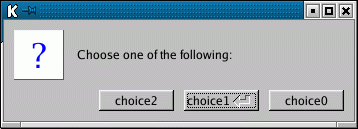
Same as choice() except a "!" icon is used instead of a "?" |
|
||||||||||||||||
|
|
|
||||||||||||||||
|
|
|
|
On Windows this makes file_chooser() call the Win32 file chooser API instead of using the one constructed in fltk. Ignored on other systems. |
|
||||||||||||||||||||
|
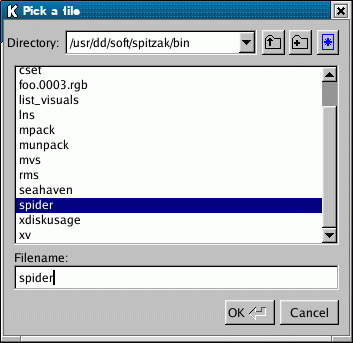
pops up the file chooser, waits for the user to pick a file or Cancel, and then returns a pointer to that filename or NULL if Cancel is chosen. message is a string used to title the window. pattern is used to limit the files listed in a directory to those matching the pattern. This matching is done by filename_match(). Use NULL to show all files. fname is a default folder/filename to fill in the chooser with. If this ends with a '/' then this is a default folder and no file is preselected. If fname is NULL then the last filename that was choosen is used, unless the pattern changes, in which case only the last directory is used. The first time the file chooser is called this defaults to a blank string. The returned value points at a static buffer that is only good until the next time the file_chooser() is called. |
|
|
This function is called every time the user navigates to a new file or directory in the file chooser. It can be used to preview the result in the main window. |
|
||||||||||||||||||||
|
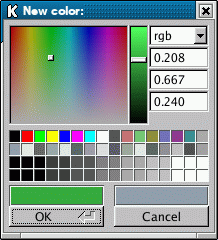
fltk::color_chooser() pops up a window to let the user pick an arbitrary RGB color. They can pick the hue and saturation in the "hue box" on the left (hold down CTRL to just change the saturation), and the brighness using the vertical slider. Or they can type the 8-bit numbers into the RGB fltk::ValueInput fields, or drag the mouse across them to adjust them. The pull-down menu lets the user set the input fields to show RGB, HSV, or 8-bit RGB (0 to 255). This returns non-zero if the user picks ok, and updates the RGB values. If the user picks cancel or closes the window this returns zero and leaves RGB unchanged. This version takes and returns numbers in the 0-1 range. There is also a class fltk::ColorChooser which you can use to imbed a color chooser into another control panel. |
|
||||||||||||||||||||||||
|
Same but user can also select an alpha value. Currently the color chips do not remember or set the alpha! |
|
||||||||||||||||||||
|
Same but it takes and returns 8-bit numbers for the rgb arguments. |
|
||||||||||||||||||||||||
|
Same but with 8-bit alpha chosen by the user. |
|
||||||||||||
|
Same but it takes and returns an fltk::Color number. No alpha. |
|
|
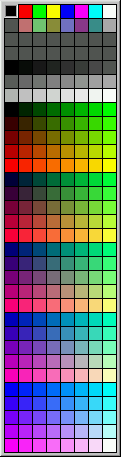
Older style of color chooser that only chooses the "indexed" fltk colors. This pops up a panel of the 256 colors you can access with "indexed" fltk::Color values and lets the user pick one of them. If the user clicks on one of them, the new index is returned. If they type Esc or click outside the window, the old index is returned.
|
|
|
This Style is used for the 50x50 icon area on the left of all the popup windows. You can change the colors or font used here. |
|
|
This Style is used for the label area for all the popup windows. You can change the textfont() or textsize() to make them print differently. |
|
|
You can change this string to convert fltk to a foreign language. |
|
|
You can change this string to convert fltk to a foreign language. |
|
|
You can change this string to convert fltk to a foreign language. |
|
|
You can change this string to convert fltk to a foreign language. |
 ©2004 Bill Spitzak and others. See Main Page
for details.
©2004 Bill Spitzak and others. See Main Page
for details.